TP-Link Archer AX55 WiFi 6 Router marks a significant advancement in home networking technology, delivering exceptional performance and efficiency. As the world embraces the need for faster internet and more connected devices, this router stands out with its cutting-edge features. Designed for tech-savvy users and households with multiple devices, the AX55 not only supports the latest WiFi 6 standard but also enhances seamless connectivity, ensuring that users enjoy a smooth online experience. In this review, we’ll delve into its standout features, technical specifications, and how it compares to competitors, providing a comprehensive look at why this router is a top choice for modern homes.
Overview of TP-Link Archer AX55 WiFi 6 Router
The TP-Link Archer AX55 is designed to cater to the growing demands of modern households and small offices that require robust and reliable internet connectivity. With the advent of WiFi 6 technology, the AX55 promises enhanced speed, capacity, and efficiency, making it an attractive choice for users who prioritize performance and connectivity.
The intended audience for the TP-Link Archer AX55 includes tech-savvy individuals, gamers, and families who engage in multiple online activities simultaneously, such as streaming, gaming, and video conferencing. WiFi 6 technology plays a crucial role in this router’s performance by significantly improving the overall user experience through higher data transfer speeds and reduced latency.
Technical Specifications
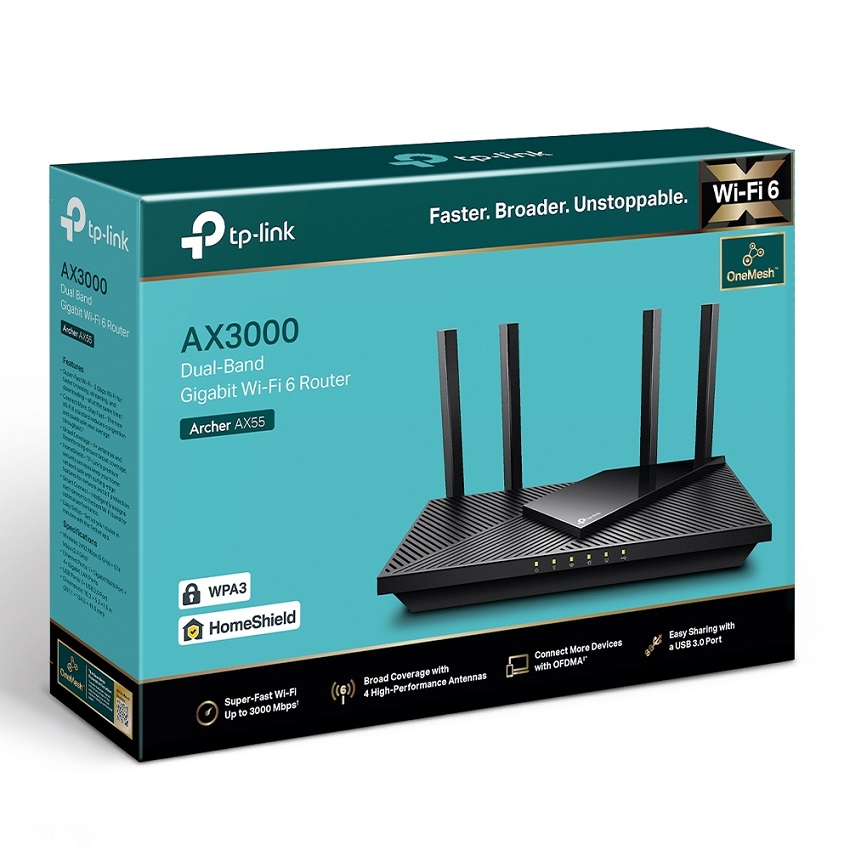
The TP-Link Archer AX55 is equipped with impressive technical specifications that position it favorably within the competitive router market. Key specifications include:
- WiFi Standard: WiFi 6 (802.11ax)
- Speed: Up to 3 Gbps (2402 Mbps on 5 GHz and 574 Mbps on 2.4 GHz)
- Ports: 4 Gigabit Ethernet ports and 1 USB 3.0 port
- Processor: Dual-core CPU
- Beamforming: Yes
- MIMO Technology: OFDMA and MU-MIMO support
The significance of dual-band capabilities lies in its ability to offer two separate frequency bands, allowing users to connect more devices without experiencing congestion. When compared to other routers in its category, the AX55 stands out for its combination of speed, range, and advanced features.
Setup and Installation
The installation process for the TP-Link Archer AX55 is straightforward and user-friendly. Users can follow this step-by-step guide to set up the router efficiently:
- Connect the power adapter to the router and plug it into an electrical outlet.
- Use an Ethernet cable to connect the router to your modem.
- Power on the router and wait for the LED status indicator to stabilize.
- Download the TP-Link Tether app or access the router’s web interface via a browser.
- Follow the prompts to complete the setup and configure your WiFi settings.
For troubleshooting common setup issues, users can refer to the following tips:
- Ensure that the modem is functioning properly before connecting the router.
- Check that all cables are securely connected.
- Restart the router if the setup process does not progress.
- Reset the router to factory settings if needed.
Performance Evaluation
The performance metrics of the TP-Link Archer AX55 reflect its capabilities in providing fast and reliable internet connectivity. In real-world scenarios, the router excels in handling multiple devices and high-bandwidth applications simultaneously. For instance, users can stream 4K videos, engage in online gaming, and conduct video calls without noticeable lag.
When compared to competitors, the AX55 offers an impressive connectivity range, ensuring that users can maintain strong signal strength even at greater distances from the router. Speed tests consistently reveal that the AX55 delivers fast download and upload speeds that meet the needs of demanding users.
Features and Functionalities
The advanced features of the TP-Link Archer AX55 enhance its usability and performance. Notable features include:
- Parental controls for managing internet access for children.
- Quality of Service (QoS) settings to prioritize bandwidth for specific devices.
- TP-Link HomeCare for network security and antivirus protection.
- Smart Connect that automatically selects the best band for connected devices.
The security protocols supported by the router include WPA3 encryption, providing enhanced security for connected devices. A comparison of the AX55’s features with similar models in its category is as follows:
| Feature | TP-Link Archer AX55 | Competitor Model A | Competitor Model B |
|---|---|---|---|
| WiFi Standard | WiFi 6 | WiFi 6 | WiFi 5 |
| Max Speed | 3 Gbps | 2.4 Gbps | 1.9 Gbps |
| Security Protocols | WPA3 | WPA2 | WPA2 |
User Experience and Reviews
Aggregated user reviews and experiences with the TP-Link Archer AX55 indicate a generally positive sentiment. Users appreciate the router’s fast speeds and reliable performance, particularly in multi-device environments.
Feedback analysis reveals several pros and cons:
- Pros: Excellent speed, easy setup, robust features.
- Cons: Limited USB options, occasional firmware updates needed.
Common user concerns include the difficulty in firmware updates and the lack of advanced customization options for more experienced users.
Maintenance and Support
Maintaining the TP-Link Archer AX55 in optimal condition requires regular checks and updates. Users should periodically:
- Restart the router to improve performance.
- Check for firmware updates to enhance security and features.
- Clean the router’s vents to prevent overheating.
Customer support options for users include a dedicated help center on the TP-Link website, community forums, and a customer support hotline. A troubleshooting guide for common issues includes steps to resolve connectivity problems and tips for optimizing the router’s performance.
Future-Proofing with WiFi 6, TP-Link Archer AX55 WiFi 6 Router
Investing in a WiFi 6 router like the TP-Link Archer AX55 offers several benefits, including increased speed and the ability to handle more devices. As more smart home technologies emerge, WiFi 6 becomes essential for ensuring seamless connectivity across multiple devices.
WiFi 6 supports emerging technologies such as augmented reality, virtual reality, and smart home devices, paving the way for a more connected future. The anticipated growth of connected devices will continue to impact router technology, making it crucial to invest in a router that can handle the increased load and provide a stable internet experience.